What Is a Fanless PC and How Does It Work?
A Fanless Pc is a computer designed to cool itself without powered fans. Instead, it moves heat away from processors and other components through conductive materials, heat pipes, or large metal heatsinks. Some models use the outer case as part of the cooling system. Warmth travels from the chip to the case, then disperses into the surrounding air. No fan noise. But the case may feel warm during demanding tasks.
This approach can suit offices, reception desks, kiosks, studios, and other places where quiet operation matters. With no cooling fan, there is one less moving part to collect dust or wear out. That does not make every model maintenance-free. Ports, storage, and other components still need sensible care, while blocked vents or cramped installations can restrict heat flow.
Performance depends on the processor, enclosure, workload, and room temperature. A compact fanless computer may handle everyday browsing and office software well, yet reduce its speed during sustained heavy work to protect itself from heat. That trade-off is easy to overlook. Fanless design is not automatically better; it is a cooling choice with practical limits. Understanding how heat moves through the system helps readers compare specifications, choose an appropriate installation, and decide whether silence matters more than peak performance.
What Defines a Fanless PC?
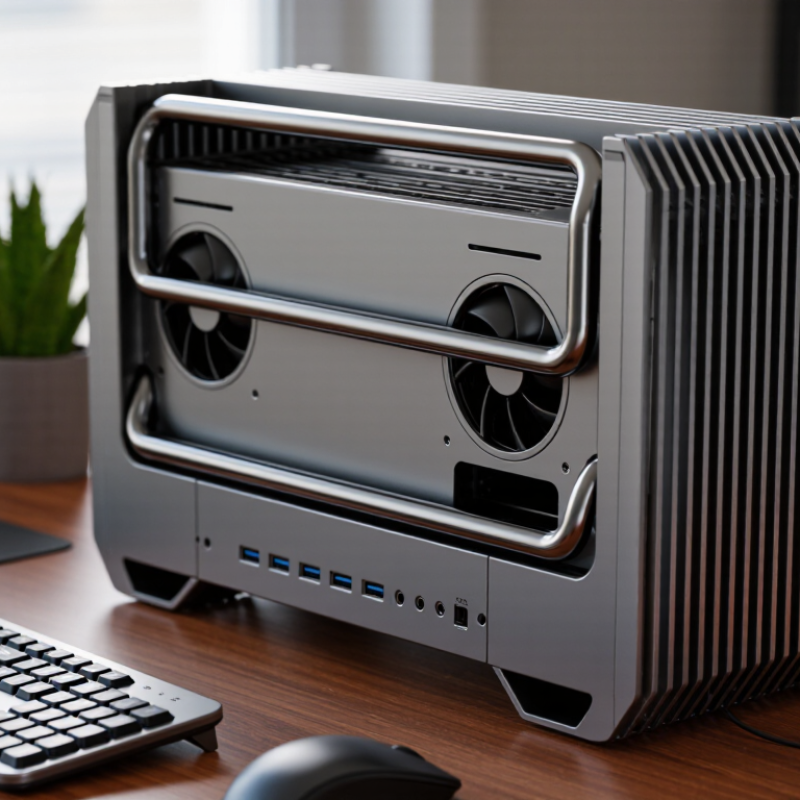
A fanless PC is defined by its cooling method: it has no internal fan moving air across its components. Instead, heat travels from the processor and other chips into heat sinks or a metal enclosure. Fins increase the surface area, allowing natural airflow to carry heat away. There is no fan noise. The case may feel warm during sustained use, which can be normal, but temperatures still need to stay within safe operating limits.
A fanless design usually pairs lower-power components with carefully planned heat paths. Its performance depends on the workload, room temperature, and enclosure—not just the label. The term is not always used consistently, so check whether every internal component is cooled passively. A power supply or add-on card may have its own fan. Dust may build up more slowly without forced airflow, but vents and connectors still need inspection. Quiet does not mean maintenance-free.
Tips: Check the manufacturer’s rated operating temperature and workload guidance. Leave space around the case, especially near cooling fins. Don’t cover it with papers or place it in direct sunlight.
What Defines a Fanless PC?
A fanless PC has no cooling fan. It releases heat through passive methods such as conduction to a heatsink or chassis, natural convection, and radiation. Fan-cooled PCs use those methods too, with a fan adding forced airflow. The chart shows whether each cooling feature is present, not its performance.
Key Components and Their Roles
A fanless PC removes heat through conduction and natural convection. The processor transfers heat through a thin thermal interface into a heat spreader or the metal chassis. External ribs increase surface area, letting warm air rise and cooler air replace it. No fan is involved.
Other parts matter too. Voltage regulators feed stable power to the processor, while memory and storage add smaller heat loads. Their placement can affect hot spots. A low-power processor helps, but it cannot compensate for a cramped enclosure or poor thermal contact. Small detail, big effect.
ASHRAE’s 2021 Thermal Guidelines recommend 18–27°C inlet air for many data-center equipment classes. This is not a PC-specific limit, but it shows why surrounding temperature matters. The U.S. Department of Energy’s 2024 data-center report estimates 176 TWh of U.S. data-center electricity use in 2023, about 4.4% of national consumption. That figure is not about fanless PCs; it underscores the cost of managing heat at scale. For a real installation, check chassis temperature under sustained load, not just during startup. A large metal case can look reassuring. It can still trap heat.
How Passive Cooling Transfers Heat
What Is a Fanless PC and How Does It Work?
How Passive Cooling Transfers Heat
A fanless PC moves heat without powered fans. The processor warms a metal heat spreader, and a thermal interface carries heat across the small gap to a heatsink or outer case. This depends on firm contact; even a tiny air pocket can slow heat transfer. Simple, but not magic. Heat then travels through the metal by conduction, spreading from the warmer processor area toward cooler surfaces. A case with broad fins provides more surface area for releasing that heat into the room.
The final steps are convection and radiation. Air touching the warm case heats up, becomes less dense, and rises; cooler air moves in to replace it. The case also emits a small amount of heat as infrared radiation. Fins help, but they need open space around them. A PC pushed against a wall or placed inside a tight cabinet may run hotter than expected. Room temperature matters, too. Passive cooling can be quiet and dependable, yet it has limits under sustained heavy workloads. I would not judge a design by its metal case alone; internal layout, component power, and installation conditions all affect performance. Dust still needs attention. It can settle between fins and reduce airflow, though no fan is present.
Performance Limits and Design Trade-Offs
A fanless PC relies on passive heat transfer rather than a spinning fan. Its processor sends heat through a metal plate or heat pipe into the outer case, which releases it into the surrounding air. The case may feel warm during heavy use. That is normal. Silence has a cost, though: the system has less room to shed heat quickly.
Performance depends on processor power limits, case size, airflow around the unit, and room temperature. A low-power chip can handle office tasks, media playback, and many control applications steadily. Long video exports or scientific calculations are different. As temperatures rise, the processor may reduce its speed to protect itself, so peak performance does not always last. A compact case tucked into a cabinet can make matters worse. Keep vents clear, even when there are no fans.
The trade-off is easy to underestimate. A brief benchmark may look strong, while an hour-long workload reveals slower speeds. Test the PC with the software and ambient conditions you expect to use. Check temperatures and sustained clock speeds, not just advertised peak figures. Quiet operation can be valuable in a bedroom or recording space. Still, a fanless design is not automatically maintenance-free or ideal for every workload. Dust can collect on cooling surfaces, and hot rooms leave less thermal headroom. Some compromises are awkward. A larger chassis may cool better, but it takes up more space.
Common Uses and Selection Factors
What Is a Fanless PC and How Does It Work?
Fanless PCs move heat through metal heatsinks and the chassis, rather than using a powered fan. They suit settings where dust, vibration, or noise can make moving parts inconvenient. Common deployments include factory monitoring cabinets, retail kiosks, digital signage, and remote edge gateways.
That matters. IDC’s 2024 Worldwide Edge Spending Guide estimated global edge-computing spending at $232 billion in 2024, up 15.4% from 2023. That growth points to more computing near equipment and users, though it does not mean every edge site needs a fanless machine.
Choose by workload, not by the label.
Check the processor’s sustained heat output, the enclosure’s operating-temperature range, and the ventilation around its installation point. A compact metal case can still overheat inside a sealed cabinet on a hot afternoon. Not magic.
Also verify the ports, mounting options, storage type, and ingress protection required at the site. A light-duty gateway may run reliably without active cooling; continuous video processing may push a passive design toward reduced performance.
Test the system with its real workload and ambient conditions. I’d leave thermal headroom, even if the spreadsheet says the maximum temperature is acceptable.